
Payment guide
How to pay with USDT or USDC
Pick the right network, send the right amount, and your payment is credited in about 20 seconds.
Which networks accept which coin
| Network | USDT | USDC |
|---|---|---|
| BNB Smart Chain (BEP-20) | Yes | Yes |
| Ethereum (ERC-20) | Yes | Yes |
| TRON (TRC-20) | Yes | No |
Paying, step by step
- 1
Match the network on both sides
Choose the same network in your wallet or exchange as the one shown on the checkout page. Sending on the wrong network is the one mistake that loses funds permanently.
- 2
Send the amount shown, not the invoice total
The checkout tells you what to send. That is deliberately different from what has to arrive, because the network fee comes out in between.
- 3
Scan the QR code or copy the address
Each invoice has its own receiving address. Copy it exactly, or scan the QR code with your wallet app.
- 4
Wait about 20 seconds
The payment is detected automatically once it confirms on-chain. There is nothing to submit and no receipt to upload.
Why the fee matters
This is the single most common reason a payment is not recognised.
Exchanges (Binance, Bybit, OKX and similar) take their withdrawal fee out of the amount you type. Enter the invoice total and a smaller amount arrives, so it will not match.
Wallets (MetaMask, Trust Wallet and similar) charge gas separately from your balance, so the amount you type is the amount that arrives.
The checkout has a fee calculator built in. Enter your provider's fee and it works out the figure to send so the correct amount lands.
Use your own app's number.Fees differ between exchanges and even between account tiers on the same exchange, so any figure quoted elsewhere is only an example. The reliable check is your app's own “you will receive” line — it must show the exact amount the invoice asks for before you confirm.
What to check before you press send
This is a real withdrawal screen. In this example the invoice was 10 USDT, so the customer typed 10.01 — because their app showed a 0.01 fee. The Receive amount line then reads exactly 10, which is what makes the payment match. Your invoice amount and your fee will both be different.
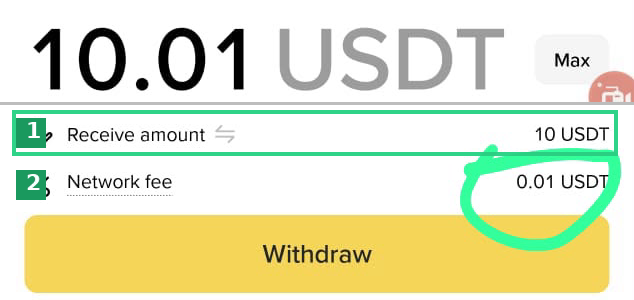
② Read your own fee here. Every app charges a different amount, and the same app charges different amounts at different account tiers — so read it off your own screen rather than copying any figure you have seen elsewhere.
If something goes wrong
If you sent the right amount on the right network and the invoice has not updated after a few minutes, contact the store you bought from and quote the transaction hash from your wallet or exchange. That hash is enough to trace and credit the payment.